I’ve spent a lot of this year giving AI agents real work to do, and email keeps coming up as the thing that separates a useful agent from an expensive chat window.
An agent that can read your inbox, draft a reply and send it when you approve is genuinely useful. An agent that can only talk at you in a browser tab is not. The problem is the middle bit: the moment you give an agent a real email address, you’ve given it your identity, and the moment it can send, you’ve given it your reputation.
Most sensible people stop there. Mammoth Mail is my attempt at making that trade-off unnecessary.
Self-hosted email for AI agents and automations. Your inboxes, your infrastructure, your control — with scoped agent access and human approval when it matters.
→ Get Mammoth Mail on GitHub · Read more on HGO Labs
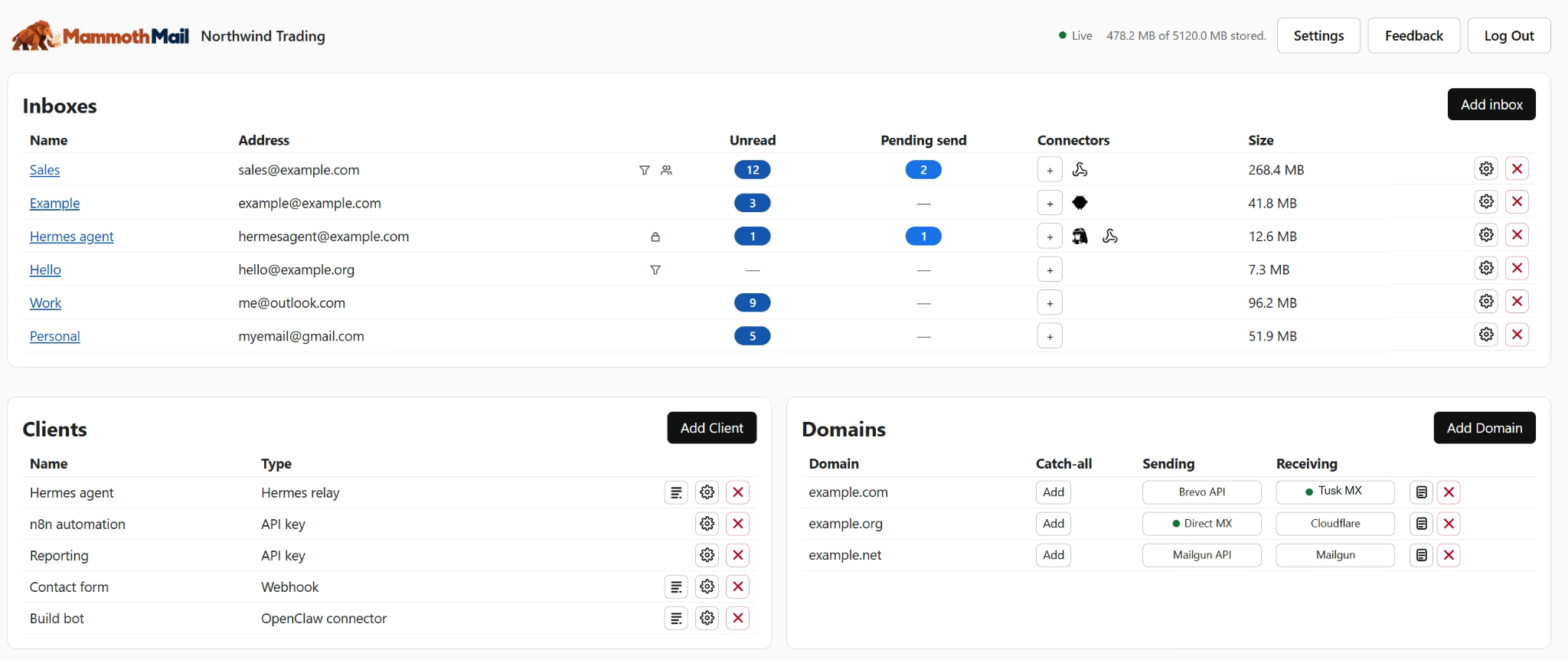
Three things that kept annoying me
The first was approval. Just about everything out there self hosted or connectors for common mail tools are all or nothing – you either give the agent full permission to the mailbox or none – so if it can read it can send. Gating that permission in code (not prompting) means you control what your agents can do within your mailbox.
The second was discovery. Handing an agent an API usually means hand-writing a chunk of prompt to explain the API to it. If the mail server can describe itself — what it is, what the key is allowed to do, what the endpoints are — then giving an agent email access should be two things: a URL and a key.
The third was the mailbox itself. I wanted real inboxes on a domain I control, not a shared third-party address with a vendor’s name in it. What I didn’t want was to become a mail server administrator to get there.
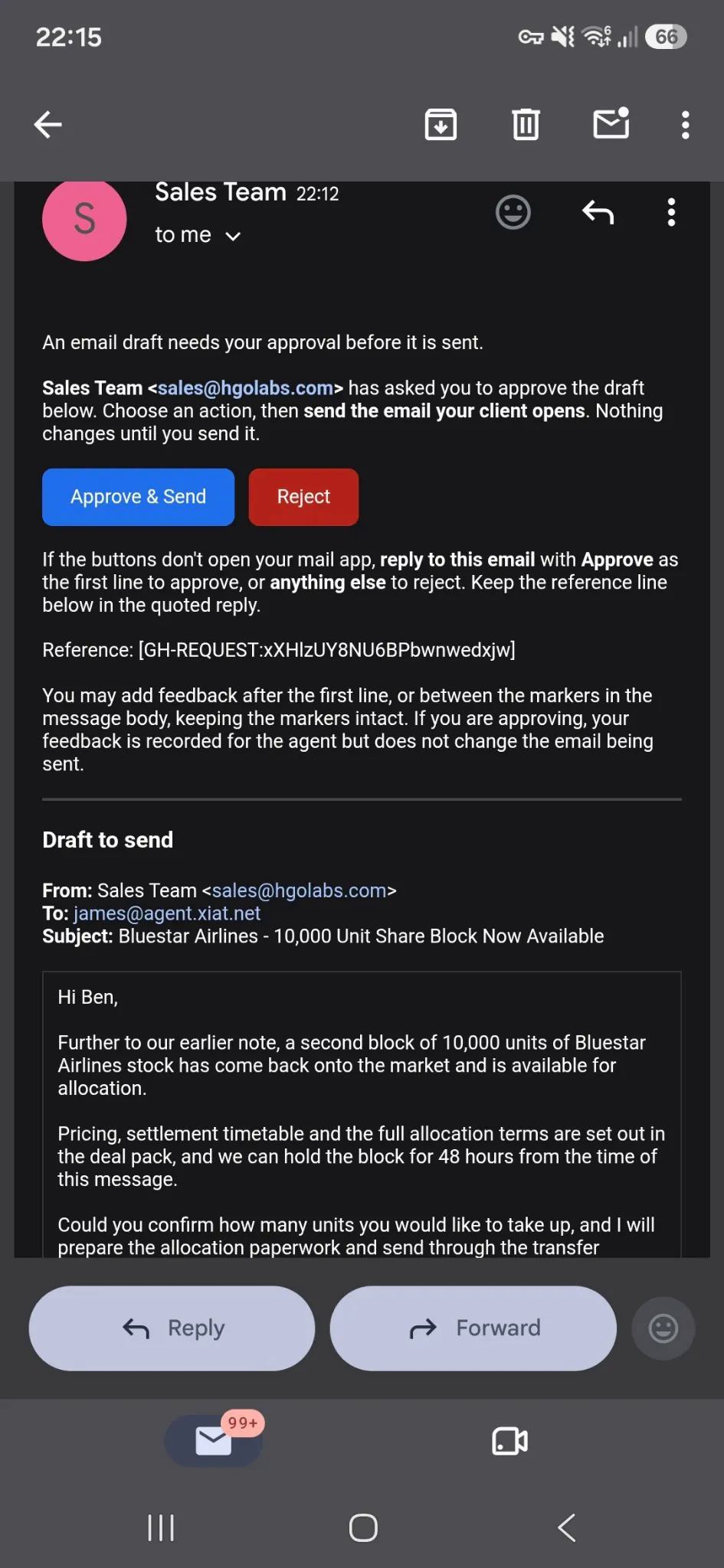
Approve a send without leaving your inbox
Mammoth Mail separates reading from sending, and the separation is enforced server-side rather than by convention. An assistant API key can read messages, search the archive, and prepare drafts. It cannot send. You can of course also grant the API key owner status if you do want to give an agent or automation full control of a specific mailbox.
Sending is a separate thing you grant. You can either leave drafts sitting in a folder for review, or have Mammoth Mail email you an approval request when the agent wants to send something. The second one is the feature I built for myself: the request lands in whatever mail client is already in my pocket, and a tap either sends the message or kills it.
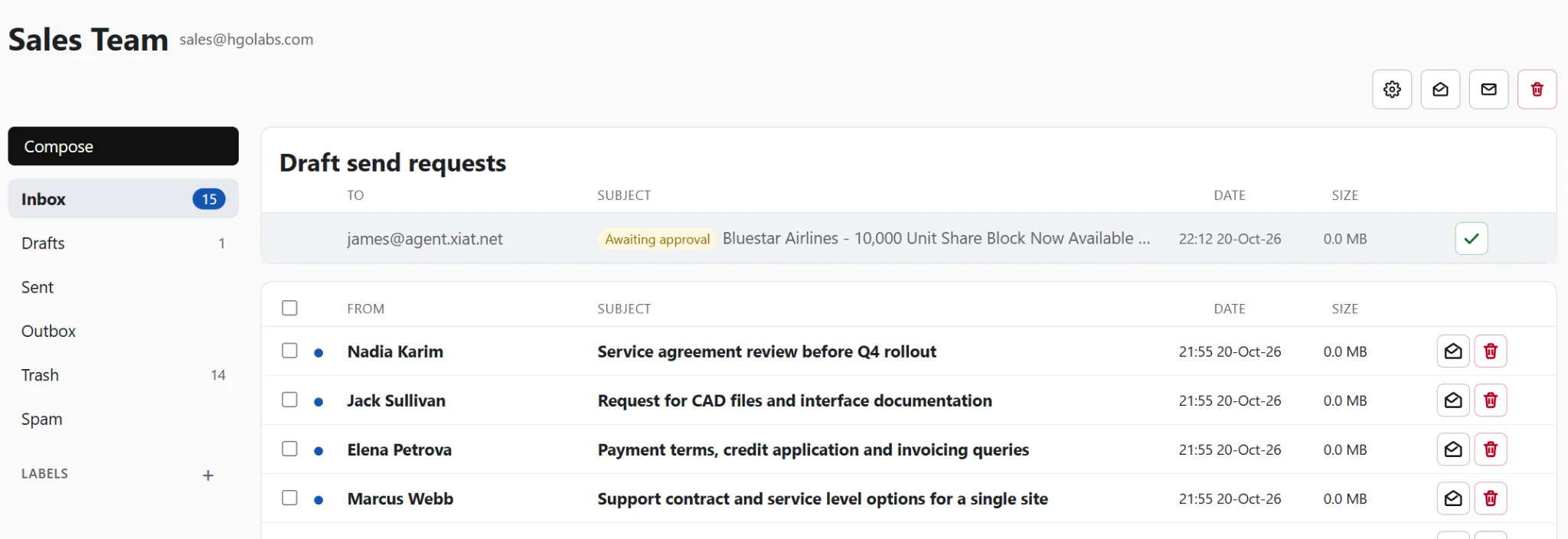
What that means in practice is that an agent can be genuinely capable and still be unable to embarrass you. It can read the thread, understand the context, write something good, and then wait — and the waiting costs you about three seconds.
An agent should be able to find the API itself
Give an agent a Mammoth Mail URL and an API key, and it can work out the rest. There’s a well-known discovery document, an agent setup guide, an endpoint that reports what the key is permitted to do, and a full OpenAPI specification. No bespoke prompt scaffolding, no copying curl examples into a system message.
The part I care about more than the discovery is what’s behind it: own-domain mailboxes and connected Gmail, Outlook and IMAP mailboxes all speak one message schema and one mailbox API. Folders are where a message lives, labels are additive, and pagination is the same everywhere. It means an agent doesn’t need a different integration path for every kind of inbox, and it means I only had to document this once.
Email on your own domain, without opening ports
Receiving mail is where self-hosting usually gets ugly. Opening inbound SMTP to your own network is the standard answer, and it’s the reason most people don’t self-host mail.
Tusk MX is the way around it. You point your MX records at Tusk, and Tusk forwards mail to your Mammoth Mail instance over a connection your instance starts. No inbound ports, no exposed SMTP listener, nothing new published to the internet.
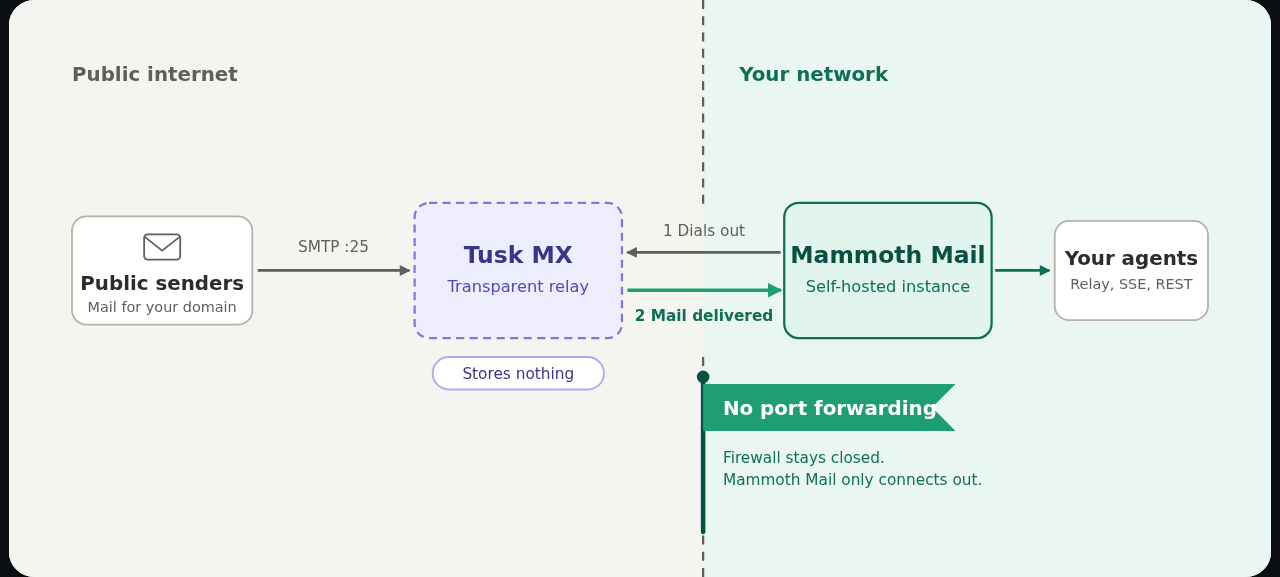
If you already have mail infrastructure, you don’t have to use it — Mailgun, Cloudflare Email Routing, Resend and Postmark all plug in as inbound providers, and there’s a Direct MX mode if you do want to receive on port 25 yourself. On the way out, bring your own Mailgun, Brevo, Resend or SMTP relay, or send direct.
Wiring an agent in should take minutes, not an afternoon
Most of the pain in agent email isn’t the mail server, it’s the connection between the two. The usual shape is a connector that polls a mailbox on a timer, plus a pile of settings to tell it how often, which folders, how much to fetch, and what to do when it gets it wrong. It works right up until you want a reply to arrive in seconds, and then you’re tuning intervals and reading logs.
The Hermes connector goes the other way. It’s five lines in a .env file:
GATEWAY_RELAY_URL=https://mail.example.com
GATEWAY_RELAY_ID=gw-...
GATEWAY_RELAY_SECRET=...
GATEWAY_RELAY_PLATFORMS=email
GATEWAY_RELAY_ALLOW_DIRECT_PLATFORMS=true
No plugin to install, no polling to configure. Hermes opens an outbound WebSocket to Mammoth Mail and holds it, so mail arrives as an event rather than as the result of a scheduled check. Unacknowledged messages are replayed when it reconnects, which means a restart or a dropped connection doesn’t quietly lose the email your agent was about to answer. Nothing needs to be exposed on the agent’s host either — the connection is outbound, so there’s no inbound port and no certificate to manage on that side.
Then it just works the way you’d hope: someone emails the agent, the agent answers them by email. Restart the gateway and the relay reconnects.
The OpenClaw connector is the same transport and deliberately still experimental — the plugin ships in the repository but isn’t published to npm or ClawHub yet, so you build it locally and install it against the OpenClaw host. Expect rough edges and please report what breaks. Between the two, the point is that connecting an agent to a mailbox should be a configuration step, not an integration project.
Getting it running
One Docker Compose file, one container, no repository checkout. Set an admin address, a password, and a real BASE_URL, then docker compose up -d.
That BASE_URL is worth emphasising, because it’s the single most common way to end up with a broken install: a lot of the sending configuration depends on it being the actual URL you use to reach the instance. The other common failure is assuming sending works because drafting works. Outbound needs its own provider configured. If you skip it, the agent will happily “send” a reply that never leaves the box.
Does the world need another mail server?
No, plainly. There are decades of excellent mail servers out there and I haven’t written a better one. What I’ve written is a mail server for a use case that didn’t exist when most of them were designed: a mailbox whose primary user is software, and whose owner is someone who isn’t a system administrator.
That use case changes the priorities. Human approval becomes a first-class concept instead of an afterthought. Machine-readable discovery matters more than an admin panel. Port exposure becomes something to design out rather than document. Those are the decisions the project is built around — there’s a fairly long design-decision record in the repository if you want to see the reasoning rather than take my word for it.
Free, open source, and in beta
Mammoth Mail is licensed under AGPL-3.0 and runs as a single Go binary in a single container.
It’s on GitHub — stars, issues and pull requests all welcome. If you’re running agents that need to send email and you’ve been putting off giving them a real inbox, this is the thing that lets you stop putting it off.